This guide will help you make your first payment orchestration API call to Payfonte in under 10 minutes. By the end, you’ll have integrated Africa mobile money API capabilities including MTN MoMo API, M-Pesa API, and other local payment methods in Africa.
Prerequisites
Before you begin, you’ll need:
A Payfonte sandbox account
Your API credentials (client-id and client-secret)
A tool to make HTTP requests (cURL, Postman, or your preferred language)
Step 1: Create Your Sandbox Account
Verify Email
Check your inbox and verify your email address.
Complete Profile
Fill in basic business information to activate your account.
Step 2: Get Your API Credentials
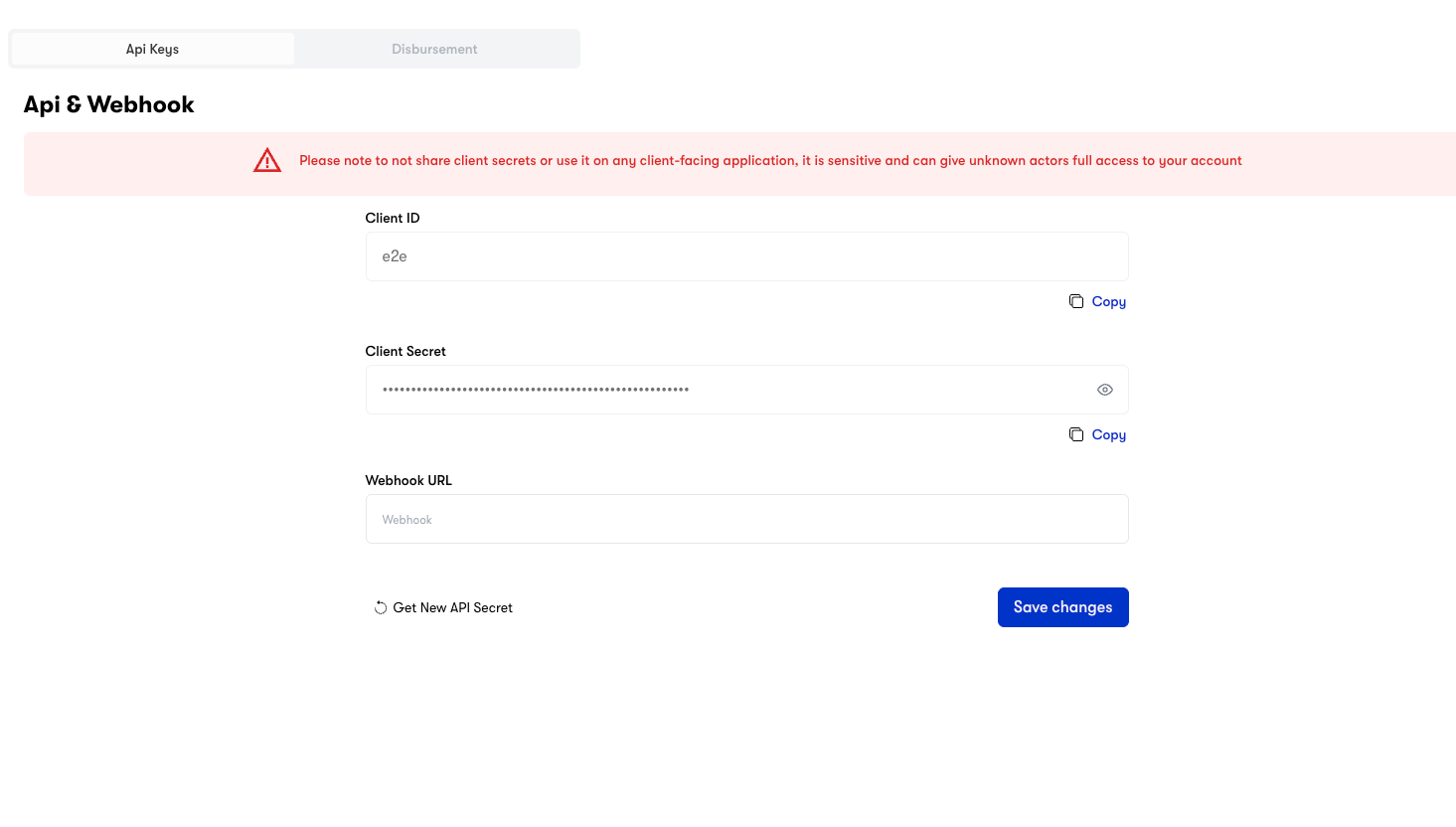
Navigate to Settings
Log into your dashboard and click on Settings in the sidebar.
Go to API Keys/Webhooks
Click on API Keys/Webhooks tab.
Copy Your Credentials
You’ll find your:
client-id - Your unique identifier
client-secret - Your secret key (keep this secure!)
Never expose your client-secret in client-side code or public repositories.
Always make API calls from your backend server.
Step 3: Set Up Webhook Callback (Optional but Recommended)
Webhooks notify your server about transaction status changes in real-time.
Go to API Keys/Webhooks
In Settings -> Security -> API Keys and Webhooks, find the webhook configuration section.
Enter Your Callback URL
Add your webhook endpoint URL (e.g., https://yoursite.com/payfonte/webhook).
Save Configuration
Click Save. You can test the webhook using our test transaction feature.
Environment URLs
Sandbox (Testing)
Production (Live)
Use these URLs for development and testing: Service URL API Base URL https://sandbox-api.payfonte.comDashboard https://sandbox-app.payfonte.comCheckout Page https://sandbox-checkout.payfonte.com
Sandbox transactions are simulated and do not involve real money.
Use these URLs for live transactions: Service URL API Base URL https://api.payfonte.comDashboard https://app.payfonte.comCheckout Page https://checkout.payfonte.com
Production transactions involve real money. Ensure thorough testing in sandbox first.
Step 4: Make Your First API Call
Let’s create a checkout session to collect a payment:
curl --location 'https://sandbox-api.payfonte.com/payments/v1/checkouts' \
--header 'client-id: YOUR_CLIENT_ID' \
--header 'client-secret: YOUR_CLIENT_SECRET' \
--header 'Content-Type: application/json' \
--data-raw '{
"reference": "order-001",
"amount": 5000,
"currency": "NGN",
"country": "NG",
"redirectURL": "https://yoursite.com/payment/success",
"webhook": "https://yoursite.com/payfonte/webhook",
"user": {
"email": "customer@example.com",
"phoneNumber": "08012345678"
}
}'
const axios = require ( "axios" );
const response = await axios . post (
"https://sandbox-api.payfonte.com/payments/v1/checkouts" ,
{
reference: "order-001" ,
amount: 5000 ,
currency: "NGN" ,
country: "NG" ,
redirectURL: "https://yoursite.com/payment/success" ,
webhook: "https://yoursite.com/payfonte/webhook" ,
user: {
email: "customer@example.com" ,
phoneNumber: "08012345678" ,
},
},
{
headers: {
"client-id" : "YOUR_CLIENT_ID" ,
"client-secret" : "YOUR_CLIENT_SECRET" ,
"Content-Type" : "application/json" ,
},
},
);
console . log ( response . data );
import requests
url = "https://sandbox-api.payfonte.com/payments/v1/checkouts"
headers = {
"client-id" : "YOUR_CLIENT_ID" ,
"client-secret" : "YOUR_CLIENT_SECRET" ,
"Content-Type" : "application/json"
}
payload = {
"reference" : "order-001" ,
"amount" : 5000 ,
"currency" : "NGN" ,
"country" : "NG" ,
"redirectURL" : "https://yoursite.com/payment/success" ,
"webhook" : "https://yoursite.com/payfonte/webhook" ,
"user" : {
"email" : "customer@example.com" ,
"phoneNumber" : "08012345678"
}
}
response = requests.post(url, json = payload, headers = headers)
print (response.json())
<? php
$curl = curl_init ();
curl_setopt_array ( $curl , [
CURLOPT_URL => "https://sandbox-api.payfonte.com/payments/v1/checkouts" ,
CURLOPT_RETURNTRANSFER => true ,
CURLOPT_POST => true ,
CURLOPT_HTTPHEADER => [
"client-id: YOUR_CLIENT_ID" ,
"client-secret: YOUR_CLIENT_SECRET" ,
"Content-Type: application/json"
],
CURLOPT_POSTFIELDS => json_encode ([
"reference" => "order-001" ,
"amount" => 5000 ,
"currency" => "NGN" ,
"country" => "NG" ,
"redirectURL" => "https://yoursite.com/payment/success" ,
"webhook" => "https://yoursite.com/payfonte/webhook" ,
"user" => [
"email" => "customer@example.com" ,
"phoneNumber" => "08012345678"
]
])
]);
$response = curl_exec ( $curl );
curl_close ( $curl );
echo $response ;
Expected Response
{
"success" : true ,
"data" : {
"checkoutId" : "chk_abc123xyz" ,
"checkoutUrl" : "https://sandbox-checkout.payfonte.com/chk_abc123xyz" ,
"reference" : "order-001" ,
"amount" : 5000 ,
"currency" : "NGN" ,
"status" : "pending"
}
}
Step 5: Redirect Customer to Checkout
Take the checkoutUrl from the response and redirect your customer to complete payment:
// Redirect customer to checkout
window . location . href = response . data . checkoutUrl ;
The customer will:
See available payment methods for their country
Select their preferred method (e.g., MTN MoMo, Bank Transfer)
Complete the payment
Be redirected to your redirectURL
Step 6: Handle the Webhook
When the payment status changes, we’ll send a POST request to your webhook URL:
{
"event" : "payment.completed" ,
"data" : {
"reference" : "order-001" ,
"checkoutId" : "chk_abc123xyz" ,
"amount" : 5000 ,
"currency" : "NGN" ,
"status" : "successful" ,
"provider" : "mtn-momo-nigeria" ,
"paidAt" : "2025-02-06T10:30:00Z"
}
}
Always verify webhook signatures and confirm transaction status via API before
fulfilling orders.
What’s Next?
Explore Collection Methods Learn about inline, standard, and direct charge integrations
Set Up Disbursements Send disbursements to mobile money and bank accounts
View All Providers See available payment methods by country
API Reference Complete API documentation
Troubleshooting
Double-check your client-id and client-secret. Ensure you’re using sandbox credentials with the sandbox URL.
Invalid Country/Currency Combination
Make sure the currency matches the country. For example, Nigeria uses NGN,
Kenya uses KES. See Supported
Providers for valid
combinations.
Webhook Not Receiving Events
Ensure your webhook URL is publicly accessible and returns a 200 status code. Check your server logs for incoming requests.